What is Packet Loss?
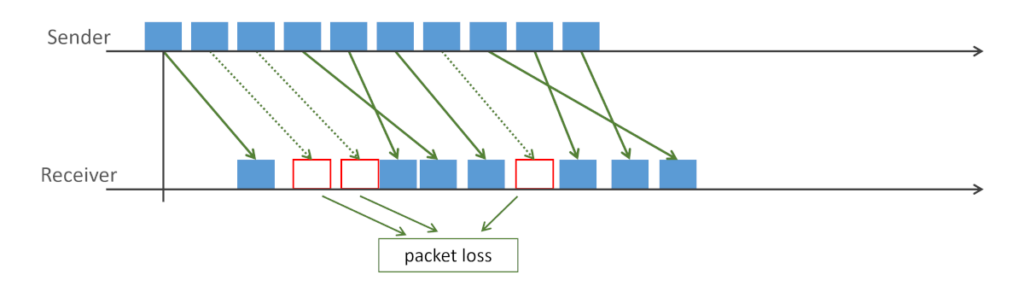
In the context of WebRTC and VoIP, Packet Loss means not receiving packets that were sent over the network.
WebRTC is sent over IP networks and in many ways, Packet Loss is simply part of the design of the network itself. Packets are sent over the network, in a best-effort mechanism where they compete over the network resources with other packets traversing the same networks.
With regular web traffic, packet losses are overcome by the use of retransmission mechanisms that are available in the underlying network protocols (TCP for example, creates a reliable transmission channel with its built in retransmission mechanism that overcomes packet loss).
In WebRTC, we think and treat packet loss differently between signaling and media:
- For signaling, packet losses are usually handled the same was as any other IP based transport mechanism - by using retransmission of an underlying TCP-based protocol (or similar)
- With media, we usually don’t have the time needed to use retransmission (retransmission adds latency), so we use other mechanisms to deal with it (see below)
What are the reasons for Packet Losses in IP networks?
Packet Loss can occurs due to two main reasons:
- Corruption, when the signal passing through the network corrupts, getting misdelivered
- Congestion, when the packets are dropped somewhere along the way due to a congestion in one or more network devices
In naïve solutions that treat packet losses, the distinction between corruption and congestion isn’t made. In more modern solutions, there are attempts to distinguish between these two reasons for Packet Losses since the treatment in each case can be quite different.
How does WebRTC deal with packet losses?
There are generally 3 ways of dealing with packet losses:
- Concealment, where we try to conceal the fact that we lost packets and we try to reconstruct the missing media packets on our own by “guessing” what was lost
- Retransmission, where we decide that we might have enough time to make use of the lost packet if we retransmit it, taking into account the latency involved
- Forward Error Correction"), where we send packets more than once beforehand (either by duplicating the packets or by creating redundant packets in other means), so that we have a better chance of the receiver receiving one of the sent packets
All of these techniques are employed by WebRTC in different ways for different types of packet loss.
Bandwidth and Packet Loss
When packet loss occurs due to congestion on the network, it means that too many packets are sent across the network making it overloaded.
This might be due to local reasons on the sender side (someone on the same device or the local network using network resources for other applications), it might be due to congestion over the internet, or it might be due to congestion in the receiving end (at times, even due to network throttling of cloud vendors).
A common approach in WebRTC is to try to estimate the network bandwidth available and limit the sender from sending more than what we are estimating. This is an important mechanism, especially for video-based sessions, where changing video bitrate dynamically in WebRTC is a very common approach.
How to measure packet loss in your WebRTC app
The most reliable source for packet loss data is the WebRTC Stats API (getStats()). Look for these fields on RTCInboundRtpStreamStats and RTCRemoteInboundRtpStreamStats:
const stats = await pc.getStats();
stats.forEach(report => {
  if (report.type === 'inbound-rtp' && report.kind === 'video') {
    const lost = report.packetsLost;
    const received = report.packetsReceived;
    const lossRate = lost / (lost + received);
    console.log(`Inbound video packet loss: ${(lossRate * 100).toFixed(2)}%`);
  }
});
chrome://webrtc-internals shows packet loss in real time under the packetsLost graph per SSRC. The fractionLost field (from RTCP Receiver Reports) gives you the loss fraction over the last measurement interval.
Packet loss thresholds: what is acceptable in WebRTC?
| Loss rate | Audio quality | Video quality |
|---|---|---|
| 0-1% | Imperceptible | Imperceptible |
| 1-3% | Slight degradation, concealed by Opus PLC | Occasional artifact, NACK covers most |
| 3-5% | Noticeable on voice | Visible freezes on fast motion |
| 5-10% | Hard to understand speech | Frequent freezes, keyframe requests pile up |
| >10% | Unusable | Sustained freeze or black video |
- WebRTC is designed for the 0-3% range. At 5%+ you should investigate the network path rather than tuning codec settings
- The above takes into account Opus for audio and VP8 for video. Other codecs and specific implementations may vary, so it is advised to make your own measurements and judgements here and use this table as a starting point
Common fixes
- Enable NACK for video (most WebRTC stacks do this by default): retransmits lost packets when there is enough time
- Enable FEC (Opus RED or DRED for audio, FlexFEC or ULP-FEC for video): sends redundant packets so the receiver can reconstruct loss without retransmission. This is less common today and is getting more adopted for audio than it is for video
- Check your TURN relay: if loss is symmetric (both directions), the network path is the problem, not the encoder. Switch to a TURN relay closer to both endpoints
- Reduce target bitrate: congestion-induced loss drops when you send less. Force a lower
maxBitrateinRTCRtpSenderparameters temporarily