
Rabbit and WebRTC: An Interview With Philippe Clavel
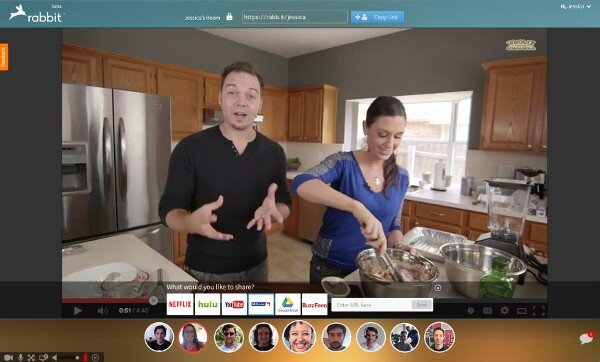
Sharing together has never been easier.
One of the nice things about the internet is the way it brings people together – especially with WebRTC. One of the interesting companies out there that is using this capability is Rabbit. They have taken WebRTC and baked it into a service where several people can meet together to share an experience on the web – watch a movie, collaborate online, etc.
 I had the opportunity to chat with Philippe Clavel, Founder and CTO of Rabbit, using their own platform. What intrigued me most was their use of virtual machines for co-browsing.
Philippe was kind enough to answer a few of my questions.
What is Rabbit all about?
Rabbit is about bringing people together. Plain and simple. In Rabbit, you can video and text chat with up to 10 of your friends, and at the same time synchronously watch videos, play games or collaborate, right from your browser.
What are the use cases you are targeting with Rabbit?
Our use case is to solve the problem of sharing experiences when you’re in disparate locations. There’s nothing better than being in the same room as someone to watch a movie, work on a project or just talk. With Rabbit, you can do all of those things – the room may be in your browser, but it’s an all-in-one experience.
It’s been fun to hear directly from users as to how they’re using Rabbit. They’re in long-distance relationships and are looking for ways to stay connected. They’re using it to teach and coach. Their companies have stopped using other chat and teleconferencing solutions and are using Rabbit instead.
I had the opportunity to chat with Philippe Clavel, Founder and CTO of Rabbit, using their own platform. What intrigued me most was their use of virtual machines for co-browsing.
Philippe was kind enough to answer a few of my questions.
What is Rabbit all about?
Rabbit is about bringing people together. Plain and simple. In Rabbit, you can video and text chat with up to 10 of your friends, and at the same time synchronously watch videos, play games or collaborate, right from your browser.
What are the use cases you are targeting with Rabbit?
Our use case is to solve the problem of sharing experiences when you’re in disparate locations. There’s nothing better than being in the same room as someone to watch a movie, work on a project or just talk. With Rabbit, you can do all of those things – the room may be in your browser, but it’s an all-in-one experience.
It’s been fun to hear directly from users as to how they’re using Rabbit. They’re in long-distance relationships and are looking for ways to stay connected. They’re using it to teach and coach. Their companies have stopped using other chat and teleconferencing solutions and are using Rabbit instead.
I had the opportunity to chat with Philippe Clavel, Founder and CTO of Rabbit, using their own platform. What intrigued me most was their use of virtual machines for co-browsing.
Philippe was kind enough to answer a few of my questions.
What is Rabbit all about?
Rabbit is about bringing people together. Plain and simple. In Rabbit, you can video and text chat with up to 10 of your friends, and at the same time synchronously watch videos, play games or collaborate, right from your browser.
What are the use cases you are targeting with Rabbit?
Our use case is to solve the problem of sharing experiences when you’re in disparate locations. There’s nothing better than being in the same room as someone to watch a movie, work on a project or just talk. With Rabbit, you can do all of those things – the room may be in your browser, but it’s an all-in-one experience.
It’s been fun to hear directly from users as to how they’re using Rabbit. They’re in long-distance relationships and are looking for ways to stay connected. They’re using it to teach and coach. Their companies have stopped using other chat and teleconferencing solutions and are using Rabbit instead.
- We had to build a native solution and could not have an installation-free process.
- A fair amount of our development efforts were focused on getting the real-time pipeline right.
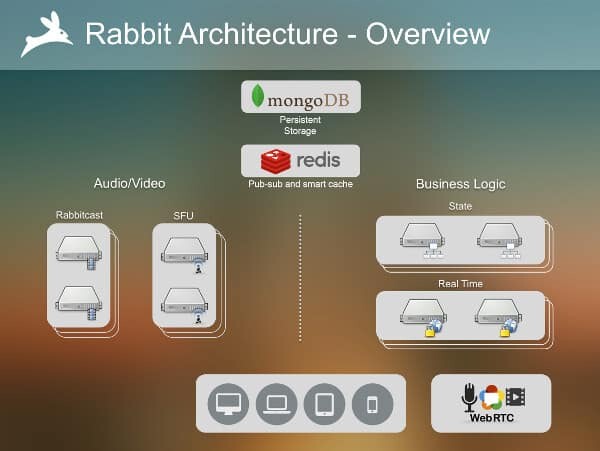
- Our SFU allows us to use WebRTC with much larger groups than the normal use case.
- For our shared viewing feature (called Rabbitcast™), we had to build a native extension to capture and delivery an HD stream with audio from our virtual machines.
- Both of them use our own WebRTC server stack to talk to the clients.
- Browser support: This one is a no brainer and I am sure that the first thing that come to mind: I would love to have Safari and IE support WebRTC.
- Browser standardization: On the top of more browsers, we need to have the same behaviors between browsers. Right now, Firefox and Chrome are not the same. Their API and the behavior is different which is even trickier when you have a SFU in the middle.
- Expose the internals: We should be able to control the bandwidth consumption from the API level. Same for jitter buffer. Some of the streams in the UI do not need to be real time, other do not need 2 Mbps quality because they are 100 x 100 pixels.
- Better flow control: While the current WebRTC flow control is working, ideally I would love to have a TCP-like behavior where you can control the retransmission. This will allow it to behave better under tough network conditions and improve the overall audio/video quality.

Tsahi Levent-Levi
Independent WebRTC analyst. I help companies ship real-time communications they can actually monitor. 20+ years in the comms space, last 13 focused on WebRTC.
More about Tsahi →