
WebRTC Electron Implementations are on 🔥
For WebRTC, Mobile and PC are moving in different directions. In the desktop, WebRTC Electron apps are gaining momentum.
In the good old days, people used to complain that WebRTC isn’t available on all browsers. Mobile was less of an issue for most as mobile application developers port WebRTC and use it natively on both iOS and Android.
How times change.
Need to know where WebRTC is available? Download this free WebRTC Device Cheat Sheet.
Today? All modern browsers support WebRTC. We’ve got Chrome, Firefox, Edge and Safari with official WebRTC implementations.
The challenge? None of the browsers are ready:
- Chrome uses Plan B, switching to Unified Plan
- Firefox is doing fine, but isn’t high on the priority list
- Edge doesn’t support the data channel, and its market share isn’t that great
- Safari doesn’t support VP8 and breaks a wee bit too often at the moment
What’s a developer to do?
Use adapter.js. Or go for a plugin. Or just ignore a few browsers.
Or maybe. Just maybe you should treat PCs and laptops the same way you do mobile? And build an app.
If that’s what you plan on doing then you’re not alone.
The most popular way to build an app for the desktop is by using Electron. There are other ways, like CEF and actual native development, but Electron is by far the most common approach.
Here are 3 vendors making use of Electron (and WebRTC) for their desktop application:
#1 - Slack
Slack are a popular team collaboration application. I’ve been using it in the browser for the last 3 years, but switched to their desktop Electron app on both my Ubuntu desktop and my Windows 10 laptop.
Why didn’t I use the app for so long? Because I don’t like installing things.
Why have I installed it now? Because I need to track 3+ slack accounts in parallel at all times now. This means a tab per slack account in my browser. On the desktop app, they don’t “eat up” multiple tabs. It isn’t a matter of memory or performance for me. Just one of “esthetics” - trying to preserve a tabs diet on my Chrome.
And that’s how Slack likes it. During the last Kranky Geek, the Slack team gave an interesting presentation about their current plans. It had about a minute dedicated to Electron in 2:30 of the session:
This recording lacks the Q&A part of the session. In an answer to a question regarding browsers support, Andrew MacDonald of Slack, said their focus is in their desktop app - not the browser. They make sure everything works on Chrome. Invest less time and effort on the other browsers. And focus a lot on their Slack desktop application.
It was telling.
If you are looking for desktop-application-only-features in Slack, then besides having a single window for all projects, there’s the collaboration they offer during screen sharing that isn’t available in the browser (yet another reason for me to switch - to check it out).
During that session, at 2:30 minutes? Andrew says why Electron is so useful to Slack, and it is in the domain of cross platform development and time to market - with their team size, they can’t update as fast as Electron does, so they took it “as is” for the built-in WebRTC implementation of it.
#2 - Discord
Discord is a kind of Slack but different. A social network targeting gamers. You can also find there non-gaming groups. Discord is doing all it can to get you from the comfort of your browser right into their native application.
Here’s how the homepage looks like:
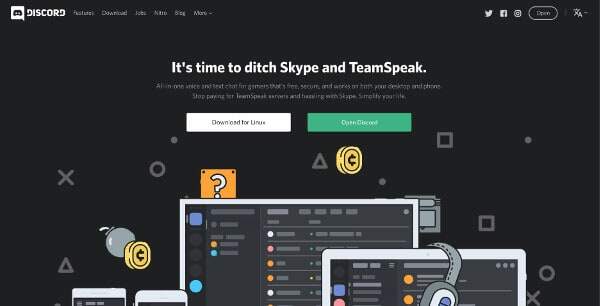
From the get go their call to action is to either Open Discord (in the browser) or Download for your operating system. On mobile, if you’re curious, the only alternative is to download the app.
Here’s the interesting part, though.
Discord’s call to action suggest by using green buttons you open Discord in the browser. That’s a lower friction action. You select a user name. Then pick an email and password (or use an unclaimed channel until you add your username and password). And now that you’re signed up for the service, it is time to suggest again you use their app:
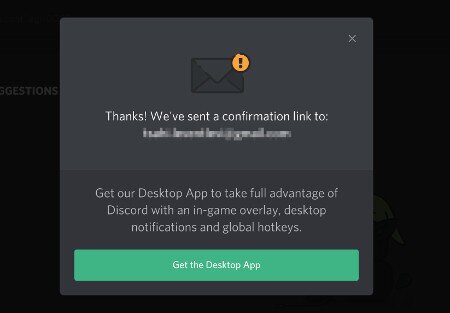
And… if you skip this one, you’ll get a top bar reminder as well (that orange strip at the top):
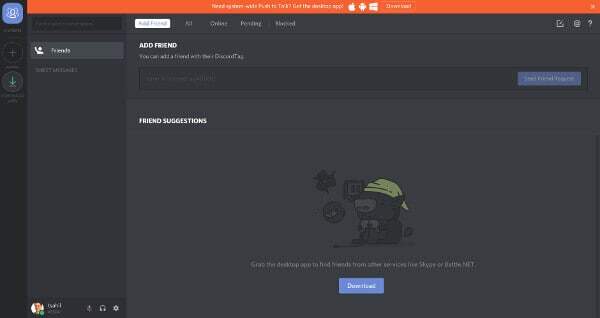
You can do with Discord almost anything inside the browser, but they really really really want to get you off that damn internet and into their desktop app.
And it is working for them!
#3 - TalkDesk
TalkDesk has its own reason for adopting Electron.
TalkDesk is a contact center solution that integrates with CRMs and third party systems. Towards that goal, you can:
- Use the TalkDesk application (=browser web app)
- Install the TalkDesk extension from Chrome, and have it latch on to other CRM systems
- install the Chrome Callbar app, so you can use it as a standalone without the need to have the browser opened at all
That third option is going the way of the dodo, along with Chrome apps. TalkDesk solved that by introducing Callbar Electron.
What we see here differs slightly from the previous two examples.
Where Slack and Discord try getting people off the web and into their desktop application, TalkDesk is just trying to be everywhere for them. Using HTML5 and Electron means they need not write yet-another-application for the desktop - they can reuse parts of their web app.
They are NOT Alone
There are other vendors I know of that are using Electron for their WebRTC applications. They do it for one of the following reasons:
- It is an easy way to support Internet Explorer by not supporting it (or Safari)
- They want a “native” app because they need more control than what a browser could ever offer, but still want to work with cross platform development, and HTML5/JS seems like the cleanest approach
- Their users work in front of the service all day, so the browser isn’t the best interface for them
- They don’t want to tether themselves or limit themselves to the browser. Using web technology is just how they want to develop
- It brings with it “stability”, as it is up to you to decide when to push an update to your users as opposed to having browser vendors do it on their own timeframe. It is only semblance as most would still support both browsers and applications in parallel
Add to that CPaaS vendors officially supporting Electron. Vidyo.io and TokBox are such examples. They do it not because they think it is nice, but because there’s customer demand for it.
This shift towards Electron apps makes it harder to estimate the real usage base of WebRTC. If most communications is shifting from Chrome browser (lets face it, most WebRTC comms happens in Chrome today if you only care about browsers) towards applications, then the statistics and trends collected by Google about WebRTC use are skewed. That said, it makes Chrome all the more dominant, as Electron use can be attributed back to Chromium.
Expect vendors to continue adopting Electron for their WebRTC applications. This trend is on 🔥.
Need to know where WebRTC is available? Download this free WebRTC Device Cheat Sheet.

Tsahi Levent-Levi
Independent WebRTC analyst. I help companies ship real-time communications they can actually monitor. 20+ years in the comms space, last 13 focused on WebRTC.
More about Tsahi →
Yep, agreed. Adopting a modern javascript frontend framework like Vuejs, React or Angular let's you then have a code base suitable for Electron use without too much tweaking. That's our plan too for WebRTC.
It worth mentioning that electron is actually chrome bundled with nodejs.
So it's does everything chrome does and also have access to the system as a any regular application have.
Roey - thanks. Somehow I missed that part in my explanation.
I'd focus it a bit and make it more accurate - it is Chromium+Node.js and not Chrome - there's a bit of a difference between the two.
whats the difference(Chromium vs Chrome) from WebRTC point of view?
That's a very good question Marek.
To the best of my knowledge, Chromium doesn't support H.264 codec in WebRTC while Chrome does. The rest is the same.
All said is excellent but the major concern with electron is , it runs behind chrome releases.Like there is a major bug in screen-sharing in chrome 58/60 which is fixed in chrome 63 ( latest while writing ) but none of the electron release have that merge yet.This effects a lot in terms of interoperability.
I agreed! WebRTC is actually available in modern browsers. But, Is there any difference between Chromium & Chrome browsers? Is WebRTC available in chromium also?
Yes David.
WebRTC is available on Chromium, but there are some slight differences - mainly due to licensing issues. For the most part though, Chromium supports WebRTC the same as Chrome.