SFU stands for Selective Forwarding Unit. Also known in the specifications as SFM (Selective Forwarding Middlebox).
At times, the term is used to describe a type of video routing device, while at other times it will be used to indicate the support of routing technology and not a specific device.
An SFU is a media server component capable of receiving multiple media streams and then deciding which of these media streams should be sent to which participants. Its main use is in supporting group calls and live streaming/broadcast scenarios.
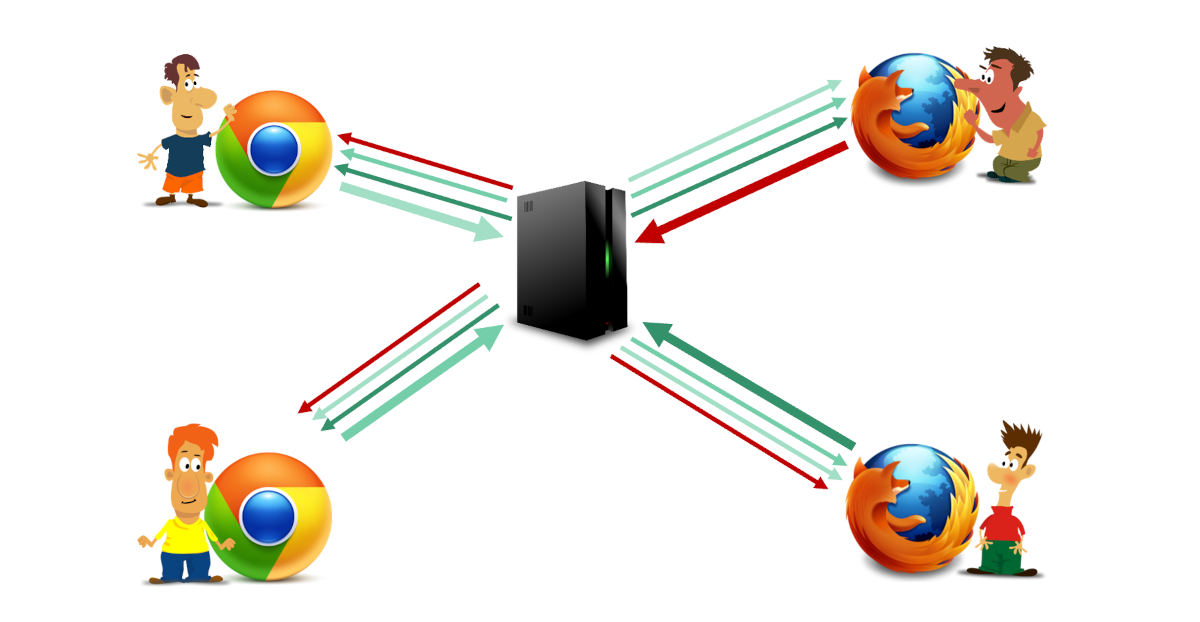
Table of contents
+ Single SFU for a session + Scaling through cascading + Publisher SFU
- SFU performance
- A quick comparison: SFU, MCU or mesh
- When to choose an SFU media sever
- Additional reading
Use cases
An SFU is usually discussed in relation to group video meetings, but it is used for many other use cases as well:
- Audio only meetings, which are generally implemented using MCUs can enjoy SFU architectures for larger scale and higher flexibility in the user experience
- Cloud gaming, where a game is streamed to multiple passive viewers or for the creation of group audio conversations within the game
- Live streaming and broadcast, in which a single publisher (or small number of publishers) stream media to a large number of subscribers
- Surveillance, when multiple cameras are displayed on a single monitor
- Education, usually for large remote classrooms or even local ones (to screen share a tutor on student devices)
SFUs are versatile and flexible, which lends their utility to many different use cases and verticals.
Want to skill up in WebRTC and become an expert? We’ve got just the thing for you - check out our WebRTC courses.
Publishers and subscribers
In many cases, we associate roles to users/streams in an SFU. The publisher is the one publishing or contributing a stream by sending its media towards the media server. The subscriber is the one who wants to receive and view a stream that has been published towards the media server. For group meetings, all users are both publishers of their own media streams as well as subscribers to media streams published by other participants. In broadcasts, there are a small number of publishers and a larger number of subscribers.
The great thing about his approach is that not all users must publish and not all users must subscribe. Furthermore, each user has its own set of subscribed streams which can be different than those of others in the session. This leads to higher flexibility and personalization of the session - either due to network and device capabilities or simply the preference and role of the user in the session itself.
The asymmetry of bandwidth
In an SFU bandwidth dynamics plays a major role. Each participant sends as a publisher only a single media stream towards the SFU (or up to 3 video streams in case of simulcast) and receives multiple incoming media streams from multiple other publishers as a subscriber.
The bandwidth sent and received isn’t symmetric in nature - it can either send or receive more or less than in the opposite direction, based on the scenario, the needs and the dynamic situation of the device and network.
With SFU scenarios, the user can also be either a subscriber, a publisher or both.
The biggest advantage of this asymmetric behavior of an SFU is that as more users are added into the session, the uplink of publishers doesn’t increase - it stays constant at a single uplink media stream.
This approach makes the SFU a flexible solution that makes intelligent use of network bandwidth resources, especially when comparing it to the mesh approach.
SFU topologies
There are several SFU topologies that are worth mentioning. These are used to serve larger sessions or sessions that spread through large geographic regions (users from multiple continents for example).
Single SFU for a session
The naive and straightforward approach is having all users join the same session on a single SFU. That SFU maintains the connections on behalf of all users.
It is the easiest topology to implement, but also the one that is most prone to problems:
- Deciding where to allocate the SFU for the session can affect the perceived quality for the participants. Remember that we prefer having the SFU as close as possible to the users, but what happens when the users are spread geographically?
- Scaling to a large session is limited by the capacity of a single SFU machine. At some point, there’s a ceiling to how many users can join a session, and that also affects allocation of sessions across available SFUs on our deployment
Scaling through cascading
With an SFU, a common technique for scaling is to use cascading. Cascading is a mechanism by which multiple SFUs are logically connected to each other for the purpose of serving a single session.
Users join an SFU that is closest to them and that SFU caters for all of the user’s needs:
- It streams the data published by the user to other users through the SFUs that manage these users’ media
- It receives media the user is subscribed to via the SFUs publishing that media on the user’s behalf and streams it to the user
Cascading can also be used as a scale out approach, where session sizes can exceed the capacity available in a single SFU server by having users join to different SFUs (even in the same region and data center) which collaborate together to cater for that single large session. This is how sessions of 10,000 and even millions of users (usually viewers) can make use of SFU cascading technology in their implementation.
The cascading approach is challenging to implement but enables greater meeting sizes as well as the better user experience since connections between the media servers and the users are local in nature and media traffic across regions is handled within the infrastructure selected and controlled by the implementer.
Publisher SFU
This approach, for a lack of a better name, assumes that each publisher gets to connected to the closets SFU available for publishing his media.
On the receiving end, as a subscriber, the user will subscribe on the SFU that published the relevant data.
This approach leads to each user connected through multiple SFUs - one to publish and others to subscribe.
It is less complex to implement than a cascading topology, but in a way harder to monitor and control, as there’s no real concept of a session that is taking place, but rather almost independent streams of publishers running throughout the network.
It is also important to mention that in this approach, the subscriber can be connected to SFUs in distant regions which may lead to a less than optimal user experience.
SFU performance
WebRTC SFUs are the most common media server architecture today when implementing large group meetings and live streaming services. The reason for that is that it gives the best return on investment. You will find these implementations in most video conferencing and group video meeting applications. In audio-only use cases they are a bit less popular, though there are a few that use them in these cases as well.
SFUs don’t process the media but rather route it around. As such, they consume considerably less CPU than their MCU alternative. Their performance relies heavily on network throughput.
When deploying SFU servers, it is recommended to place them as close as possible to the users that need to connect to them, spreading them geographically across the globe.
A quick comparison: SFU, MCU or mesh
| Mesh | SFU | MCU | |
|---|---|---|---|
| Server cost | Zero (no media servers) | Low to medium | High (heavy CPU use for mixing) |
| Client CPU (sender) | High (multiple encoders) | Low to medium (simulcast or SVC complexity) | Low (sends a single stream) |
| Client CPU (receiver) | High (decodes everything) | Low to medium (decodes what is selectively sent to it) | Low (decodes a single stream) |
| Bandwidth (uplink) | High (N-1 streams) | Low (single stream) | Low (single stream) |
| Implementation complexity | Low to medium | Medium to high | Low (similar to P2P) |
| Latency | Lowest (direct) | Low (forwarding delay) | Higher (processing delay) |
| Scalability | 2-5 participants | Hundreds to thousands per server | Limited by server CPU (usually low tens of participants) |
| Layout control | Client-side (flexible) | Client-side (flexible) | Server-side (fixed and rigid) |
Technology used in SFUs
Common technologies used with an SFU include:
- Simulcast, enabling receiving multiple video streams at different bitrates and then selectively deciding which to forward to which viewer
- Temporal scalability used to create a video stream that has less dependencies between its frames, enabling dropping the frame rate on the bitstream when forwarding to certain viewers with less available bitrate (or need)
- SVC, used to send a single video stream from senders that has multiple layers in them that enable the SFU to strip some of these layers independently per viewer
- Insertable Streams, used to provide E2EE in group calls so that the media servers will not have access to the actual media they are processing
- Cascading, used in large scale deployment to enable SFUs to collaborate together and get users to connect to the closest SFU while still being in the same session
- WHIP/WHEP protocols as standardized way to ingest and egress media through an SFU, especially in 1-to-many use cases of live broadcasting
When to choose an SFU media sever
An SFU is ideal if you have the following requirements:
- Group meetings with 3 or more participants
- Broadcasts and live streaming where sub-second latency is required
- Services where layout flexibility (client-side control) is a priority
For 1:1 sessions, you usually don’t need an SFU, unless you are planning to add features such as recording or live transcription (which necessitates the use of speech to text server processing).