
WebRTC TURN: Why you NEED it and when you DON'T need it

WebRTC TURN servers are an essential piece of almost any WebRTC deployment. If you aren’t using them, then make sure you have a VERY good reason.
Connecting a WebRTC session is an orchestrated effort done with the assistance of multiple WebRTC servers. The NAT traversal servers in WebRTC are in charge of making sure the media gets properly connected. These servers are STUN and TURN.
Key Takeaways
- WebRTC TURN servers are vital for connecting sessions when direct connections fail
- STUN servers help discover public IP addresses; however, TURN servers relay media when users cannot connect directly
- TURN servers require proper installation and configuration, as misconfigurations can complicate WebRTC connections
- For testing TURN configurations, blocking UDP and using Google’s Trickle ICE sample can help ensure functionality
Want to connect MORE sessions in your WebRTC application?
I’ve got you covered with this short video minicourse. Just register below and you’ll get the first email immediately.
STUN, TURN and ICE

Before we start, it might be good to quickly explain these three terms, and we’re going to have the simplified version here, focused on WebRTC and the context of servers:
WebRTC STUN server
STUN - STUN servers are used to find the public IP address of the user. They are needed for the majority of the services. It should be noted though that a TURN server acts also as a STUN server when used over UDP transport.
You can find free STUN servers over the internet, which is rather useless… especially if you’re using TURN (because TURN can second as a STUN server).
WebRTC TURN server
TURN - TURN servers relay media when the users can’t reach each other directly. They use lots of bandwidth resources and cannot view the actual media since it is encrypted and they don’t have the encryption keys. You can relay over TURN servers using either UDP, TCP or TLS. What will be used exactly depends on your configuration and the network.
TURN servers are a pain. You need to install and maintain them, deploy them in multiple regions, and pay for them. This is the kind of infrastructure decision I dig into in my Advanced WebRTC Architecture course. A common approach is to use a managed service instead of having your own.
🛑 Don’t use free public WebRTC turn servers. You get what you paid for, and remember that TURN costs money. So if you’re not paying for it, the vendor offering it freely isn’t using the best network either…
ICE protocol in WebRTC
ICE - ICE isn’t a server. It is a protocol/algorithm that is used to connect WebRTC entities to one another. It decides if STUN or TURN are needed for the session and when.
In WebRTC, Trickle ICE is used by default, which is meant to make the time to connect a session shorter.
Now that we know a wee bit about these terms and servers, time to see how we use them in WebRTC.
3 ways to connect WebRTC sessions

When connecting a session between two browsers ( peer-to-peer ) in WebRTC, there are 3 different alternatives that might happen.
Connect directly, across the local network

If both devices are on the local network, then there’s no special effort needed to be done to get them connected to each other. If one device has the local IP address of the other device, then they can communicate with each other directly.
Most of the time and for most use cases, this is NOT going to be the case.
Oh, and just because we all love complicating things in WebRTC, you might bump into mDNS addresses instead of private IP Addresses…
Connect directly, over the internet, with public IP addresses
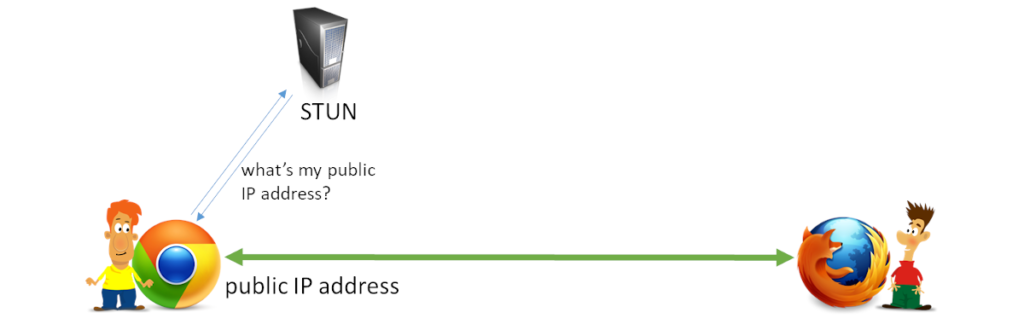
When the devices aren’t inside the same local network, then the way to reach each other can only be done through public IP addresses. Since our devices don’t know their public IP addresses, they need to ask for it first.
This is where STUN comes in. It enables the devices to ask a STUN server “what is my public IP address?”
Assuming all is well, and there are no other blocking factors, then the public IP address is enough to get the devices to connect to each other. Common lore indicates that around 80% of all connections can be resolved by either using the local IP address or by use of STUN and public IP addresses.
Route the media through a WebRTC TURN server
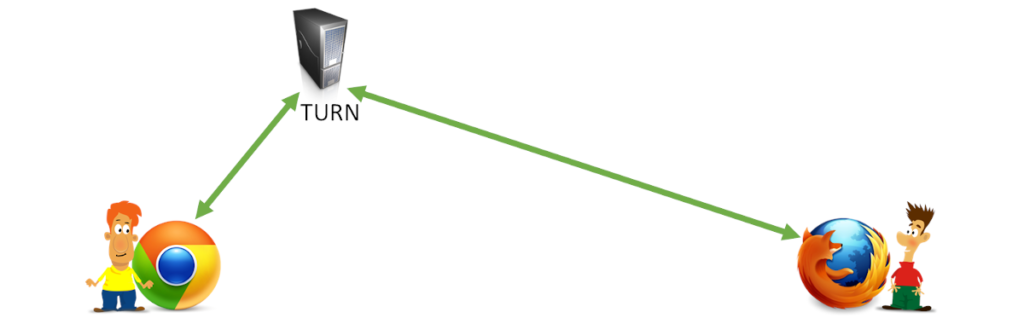
Knowing the public IP address is great, but it might not be enough.
There are multiple reasons for this, one of them being that the NAT and firewall devices in use are not allowing such direct traffic to take place. In such cases, we route the data through an intermediary public server called TURN.
Since we are routing the data, it is an expensive endeavor compared to the other approaches - it has bandwidth costs associated with it and it is why Google won’t ever offer a free TURN server.
Transport protocols and WebRTC TURN servers
TURN comes in 3 different flavors in WebRTC (6 if you want to be more accurate).
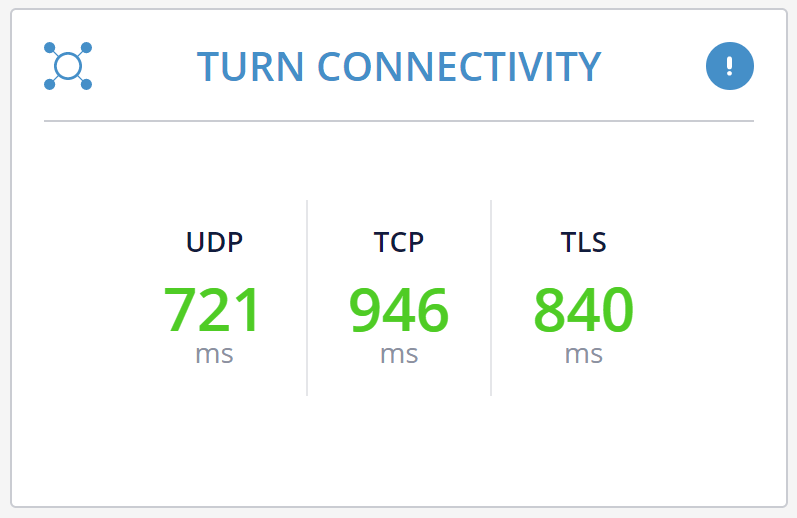
You can relay your WebRTC data over TURN by going either over IPv4 or IPv6, where IPv4 is (still) the more popular choice.
Then there’s the choice of connecting over UDP, TCP or TLS.
UDP would work best here because WebRTC knows best when and how to manage network congestion and if to use retransmissions. Since it doesn’t always work, it might require the use of TCP or even TLS.
Which type of a connection would you end up with? You won’t really know until the connection gets established, so you’ll need to have all your options opened.
When is a TURN server needed in WebRTC?

That’s easy. Whenever there can’t be a direct connection between the two devices.
For peer to peer, you will need to install and run a TURN server.
And you’d rather use UDP than TCP and you’d rather use TCP than TLS.
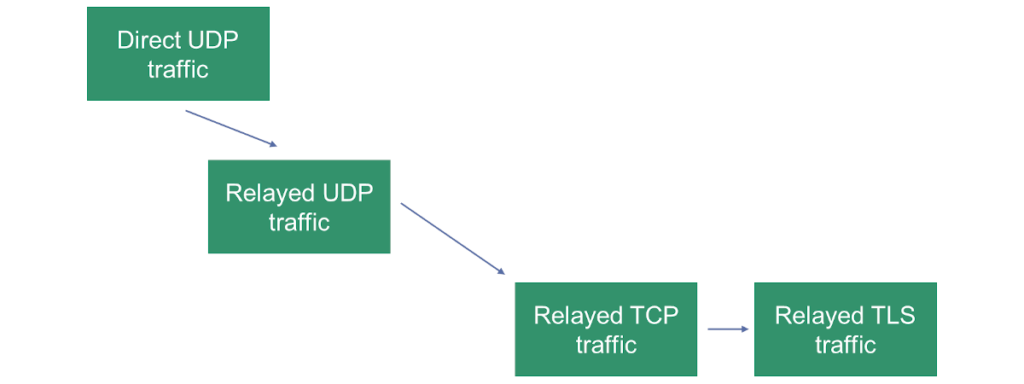
The illustration above shows our “priorities” in how we’d like a session to connect in a peer to peer scenario.
If you are connecting your devices to a media server (be it an SFU for group calling or any other type of a server), you’ll still need a TURN server.
Why? Because some firewalls block certain types of traffic. Many just block UDP. Some may even block TCP.
With a typical WebRTC media server, my suggestion is to configure TURN/TCP and TURN/TLS transports and remove the TURN/UDP option - since you have direct access to the public IP address of the media server, there’s no point in using TURN/UDP.
💡 It seems there are cases where random ports might be blocked while UDP port 443 left open. Might make sense to use TURN/UDP even with the use of media servers
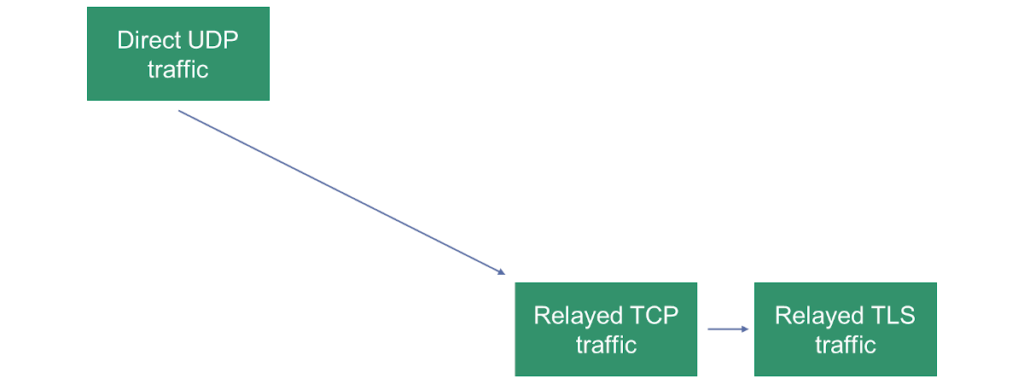
The illustration above shows our “priorities” in how we’d like a session to connect with a media server.
What about ICE-TCP?

There’s a mechanism called ICE-TCP that can be used in WebRTC. In essence, it enables a media server to provide in the SDP an ICE candidate using a TCP transport. This means the media server will actively wait on a TCP port for an incoming connection from the device.
It used to be a Chrome feature, but now it is available in all web browsers that support WebRTC.
This makes the use of TURN/TCP unnecessary, but will still leave us with the need of TURN/TLS.
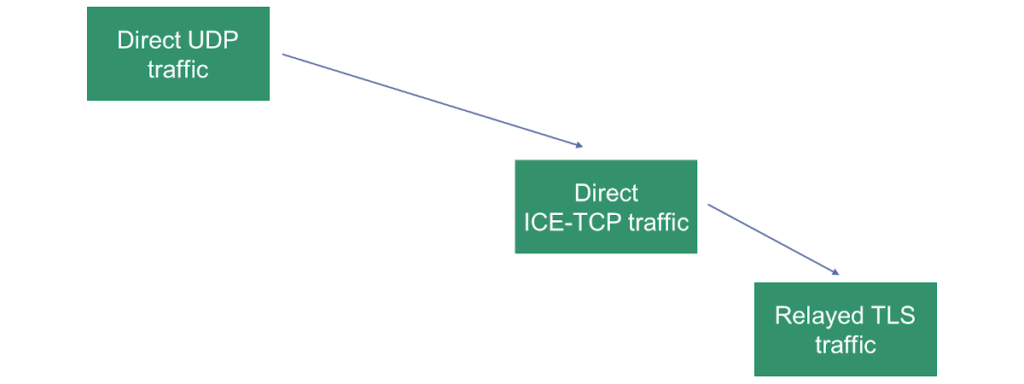
The illustration above shows our “priorities” in how we’d like a session to connect with ICE-TCP turned on.
The elusive (mis)configuration of TURN servers in WebRTC

Configuring TURN servers in WebRTC isn’t an easy task. The reason isn’t that this is rocket science. It is more due to the fact that checking a configuration to ensure it works properly isn’t that simple.
We are used to testing things locally. Right?

Here’s the challenge - in WebRTC, trying it on your machine, or with your machine and the one next to it - will ALWAYS WORK. Why? Because they connect directly, across the local network. This means TURN isn’t even necessary or used in such a case. So you never test that path in your code/configuration.
What can you do about it?
- Be aware of this
- Use the sample provided by Google for Trickle ICE testing. It won’t check everything, but it will validate that you’ve at least installed and configured the TURN server semi-properly
- Block UDP on the machine in your local network and then try to connect a session to another machine on your local network. Make sure it went over TURN/TCP relay (check webrtc-internals dump for that)
The above things can be done locally and repeatedly, so start there. Once you get this to work, move towards the internet to check it there.
And if this is giving you a headache, then your best bet is simply to use a managed WebRTC TURN service and be done with it.
Quick facts
That depends. Some WebRTC media servers support ICE-TCP, which can be considered as an alternative for TURN/TCP and TURN/TLS.
If your media server doesn't support ICE-TCP, you will likely need TURN servers with TCP and TLS configured.
Usually not. In most cases you will be installing media servers with direct internet access on a public IP address. This means that having TURN configured only on the WebRTC client side is enough.
An easy way is to block UDP traffic and see if your WebRTC client can still connect. Another one is to use Google’s Trickle ICE sample.

Tsahi Levent-Levi
Independent WebRTC analyst. I help companies ship real-time communications they can actually monitor. 20+ years in the comms space, last 13 focused on WebRTC.
More about Tsahi →
Why don't media servers include TCP & TLS ICE candidates in their Offers? This way we can eliminate the need for another network element. Is it because they are usually deployed behind a NAT/FW?
They can do TCP by way of ICE-TCP and some of them support it rather nicely.
I don't believe WebRTC allows them to offer TLS ICE candidates. The solution for that is to install a TURN server alongside the media server, but that's not what you're after.
Do you have any specific recommendation for opensourceTURN server ?.
eg : https://github.com/coturn/coturn
coTurn is the most popular one and the best bet.
Coturn is the obvious choice if you want a opensource TURN server, but if you don't want to setup your own server the https://openrelayproject.org provides a free, production ready TURN servers for anyone to use.
Samuel,
This has appeared two day ago already and the same answer still applies:
Any free TURN server is suspect.
The cost of running TURN properly and at scale is considerable, so doing it for free means either you are the product (and I can’t see how) or the service itself won’t fit production requirements.
Did you write something about REST API for access to turn services?
Any suggestion for implement this?
Since I think is not good idea write password in the front.
https://tools.ietf.org/html/draft-uberti-behave-turn-rest-00
Tranks!
I haven't written about that, though I do plan to maybe do a full course on TURN servers.
The best writing resource I can remember on this is this one: https://webrtchacks.com/webrtctrunk/
Nice article Tsahi, Thanks a lot for it..
Can you give a pointer for recording: Full Screen + video (external input i.e, from camera) ?
Thanks & Regards,
Arun Dhwaj
See here: https://bloggeek.me/recording-webrtc-sessions/
What would be the best way to test TURN server cofigurations besides Google's Trickle ICE testing tool? It seems that my coturn configuration works fine with the testing tool, however on some networks the WebRTC connection seems not getting established.
Marko,
I am planning a new course on TURN servers later that year that will cover such issues.
First thing you should probably do is check which port you've configured your TURN servers on - they should be on 443, otherwise, there will be networks that will block it (and the Trickle ICE testing tool will work for you on your network).
Great article and thank you for explaining the differences between different protocol options for connectivity. Though I hoped you would also talk a bit more how does using direct UDP vs. relayed UDP vs. relayed TCP vs. relayed TLS affects latency, given that you provided a picture with different latencies. Do you have any experience how much does it affect it? I'm currently developing a solution for remote drone control and live streaming and sub 1s latency is kind of a maximum latency to still be able to control drone remotely. After doing some testing via remoted connected clients via Internet (mobile network towers, WiFi) I noticed that for quite a lot of them it falls back to relayed traffic. Though still not sure how much does it affect the latency, but it's definitely increased as it's P2P anymore based on my understanding, right?
Also regarding your point of testing it locally by blocking UDP traffic, that's a great advice. May I add that I personally then just went with testing it via additional device connected to mobile network. Ofcourse this means you need to have your solution deployed on the Internet.
It might not be increased, though it probably will.
First thing to do is to understand what "quite a lot" is. If this is over 20-30%, I'd try to figure out why and get a good explanation to it (or just fix it).
TURN usually adds latency though will stay within your 1s latency requirement. UDP will be better than TCP and TLS - especially when there are bad network conditions.
How to do video call one to one without stun or turn server?
I already did it, and it works on another network like jio 4G to airtel 4G.
But everywhere I see that it is not possible to video call without stun or turn server.
my second doubt is:- when I send an offer using ajax and the second peer connected, after that it needs any third server or video calling without a server?
My third doubt is:- every time offer SDP details are the same or different. Suppose a user saves your SDP details , then can he connect when I use this site?
How to Secure Video Call?
Nila,
I guess these are a lot of questions. I'd suggest my online courses for that, but let me see if I can help you here -
1. You can't call from one private network into another without STUN and/or TURN. This is why it isn't really possible everywhere, or in practicality, anywhere.
2. After the Offer, there needs to be an Answer sent back. Without it, you can't connect. After that, you need to trickle the ICE candidates, which are again more messages that require a server. Then there's STUN and TURN (servers). And you may need a media server - especially if you want to do group calls.
3. You can't copy the SDP from one session to another. The listening addresses are different between sessions (see this- https://bloggeek.me/webrtc-ports-ip-addresses/)
4. WebRTC already does a lot of the work of securing the calls. It is up to you to keep it up (here - https://bloggeek.me/is-webrtc-safe/)
Hi, STUN binding request and Success Response contain a username value in clear text (believe to be the short-term credential) within the traffic of an active call. I understand that it is needed but this username can be captured and recover using any sniffing tool. What is the best way of avoiding this disclosure? using STUN over TLS but how bad are the repercussions ? Many thanks
Kevin,
Sniffing tools won't see that since it goes over TLS. JS code (and extensions) certainly will.
The current best practice is to use ephemeral passwords that are short-lived, and to not really use usernames to identify anyone.
> Sniffing tools won’t see that since it goes over TLS. JS code (and extensions) certainly will.
I am no web/fullstack developer but currently looking into the webrtc/stun topic. I did read the Webrtc source code for STUN. The webrtc functions accep a "stuns:myserver.com:443" URI but there is no TLS support in Webrtc. Therefore i dont undestand how you can state the STUN traffic goes over TLS?
I did test diverse webrtc stun/ice tools like "trickle ICE" and captured the traffic with wireshark. All turn sessions are unencrypted. Even when connecting to a coturn server offering TLS on port 443 the webrtc stun implementation falls back to clear channel communication. Without even telling you this.
WebRTC encrypts all media regardless of TURN, STUN or anything else. It uses SRTP and the key exchange for that happens out of scope for TURN (or STUN for that matter).
Using TURN/TLS and/or port 443 is done in order to traverse through restrictive firewalls and nothing more - the actual TLS encryption in there adds nothing to the security or privacy of the session.
Thank you for the article, but my understanding of this is a bit different. If clients (behind NAT, presumably) are only ever connecting to a WebRTC media server with a public IP address (like in a meet-me conference scenario; never peer-to-peer and always originating from the client), then I wouldn't think STUN or TURN would be necessary. Am I misunderstanding something?
Eric,
Lets say your user is behind a firewall that blocks UDP and TCP traffic, but allows TLS traffic on port 443, just to keep the web browser working. How would it connect to your media server?
hi,
You shared a great article about the webrtc and the turn..
I have created a chat application for my site and audio & video calling also in it and its working fine. I am using Google's free STUN server and for TURN use turn:numb.viagenie.ca.
my question is: is these free turn servers are secure means our data is secured over these servers? I am bit scared about this. Could you please tell me the truth about this.. I already read hundreds of article over internet. but didn't find a satisfactory answer. Could you please help me over this.
Thanks
Tonie,
TURN is not a free service. It costs money for the one operating it (mainly in bandwidth costs). It is also something that needs to be deployed as close to the user as possible.
If I were you, don't use free TURN servers where you don't have an SLA or an understanding of their deployment.
As to your question, with WebRTC at least, the TURN server has no access to the data since the data is end to end encrypted from the point of view of the TURN server and it has no ability to decrypt it.
Thank you so much...
Great answer to understand the security level over the TURN.
:)
One other (newish) reason you may need TURN.
Safari no longer reveals your host IP address unless you are sending microphone or camera data. (see MDNS candidates)
So if you want to view (without sending) an IoT video stream (say from a home security cam)
on your iphone browser over 4g , you probably need TURN.
Thanks Tim!
Hello, what are the settings in coturn so that it prioritizes the UDP and then just use the TCP as fallback? Below are my settings. But it always use the TCP first. thanks
no-cli
no-tls
no-dtls
stun-only
You should ask this on the coturn project page itself. If I were you, I'd first check if UDP is even reachable for that server - remove all TCP and TLS addresses from your iceServers and see what happens.
Dear Tsahi,
When I see your reactions, I get the impression that it is not possible to make (video) calls within two different networks without a turn server. Now I have made a web app with webrtc. When I use it in the browser on an iPhone (safari) it just works, without a turn server. But when I use the same connection in a native app, it only works locally. Could that be related to the Turn server? It works fine in the browser on the phone but not in the app.
Van,
In many cases, you can connect WebRTC sessions across networks without a need for a TURN server (you'll still need STUN for that).
As to your specific problem, I can't really say what the problem is without more information and logs, which is something that doesn't fit into a comments section in an article.
my first question where do i get Stun and turn server.secondly i have azure virtual machine can i get stun and turn service from azure
thirdly i am using simple peer library in reactjs ho do i configure turn and stun server.
my video group calling works on same local network but it doesnot work outside the same network
You can install and configure coturn as your STUN and TURN servers on Azure. If I were you, I'd go and use managed TURN from either Twilio or Xirsys. It will cost you a bit, but a lot easier.
To integrate it into simple peer, you'll need to pass the servers and their credentials in the iceServers parameter to the peer connection.
All that is secondary. If you are planning to run a video group calling using simple peer, then move on. That would be suitable for 1:1 calls only (or maybe 3-4 participants at a stretch, on a good network and after you've optimized it). Find a media server (jitsi, janus, mediasoup) and use it instead.
Is it possible, on a connection with more than two clients, to set up one of the clients as a sort of temporary TURN server to relay streams for the other clients if it is on a network able to receive incoming connections and the other clients are not? Or would a given client needing a TURN relay for one connection always need a TURN relay for all connections?
Derek,
WebRTC is end to end encrypted. The TURN server has no access to the keys of the session. Since the keys are negotiated directly between the clients, you can't have 3 clients sharing the same key - at least not without changing the code of WebRTC itself. So no - what you suggest can't be done with WebRTC.
For your peer to peer traffic flow illustration, if you were to incorporate ICE-TCP, would you draw:
1. [Direct UDP] -> [TURN/UDP] -> [DIRECT ICE-TCP] -> [TURN/TCP] -> [TURN/TLS]
or
2. [Direct UDP] -> [DIRECT ICE-TCP] -> [TURN/UDP] -> [TURN/TCP] -> [TURN/TLS]
Let's take a single call between 2 peers, where the TURN server sits exactly in the middle.
1. For #1, is UDP that much more superior to TCP for time-sensitive phone calls that would justify using a TURN server before Direct TCP?
2. Comparing TURN/UDP against Direct UDP (where TURN server sits in the middle between 2 people), any important drawbacks (added delay, etc) for the TURN method? besides operating cost.
3. For #2, would trickle method work for ICE-UDP&TCP?
David,
UDP is superior to TCP for VoIP traffic the moment you factor in packet losses. TCP retransmits while UDP doesn't - retransmissions can make a congestion problem worse, while a good VoIP implementation can work its way out of such a corner over UDP. So I'd pick option <1>
TURN/UDP might be better than direct UDP as you can easily configure it to a single static listening port - 443.
Not sure I understand the last question but I'd say that trickle is orthogonal to all this. It is used to speed up collection and negotiation of these candidates.
I'm not associated with the offerer of this service. I found it even strange to see somebody giving expensive service for free, but what do you think about this?
https://www.metered.ca/tools/openrelay/
Thanks. Any free TURN server is suspect.
The cost of running TURN properly and at scale is considerable, so doing it for free means either you are the product (and I can't see how) or the service itself won't fit production requirements.
It does not work. I tried it. I don't know why they advertise this. It's ridiculous. Probably to drive traffic to their paid service. But it won't work 95% of the time.
*Replying to your above response from Feb 22nd
*Keep getting blocked as spam
I'll go with option 1. But that made me curious if it's possible.
Doesn't WebRTC pick the ICE connection with the shortest route? Or can I tell WebRTC to do [Direct UDP -> TURN/UDP -> Direct TCP -> TURN/TCP] for every single ICE negotiation?
And is Direct ICE-TLS possible? If so, would you consider:
Option 3 [Direct TCP -> TURN/TCP -> Direct TLS -> TURN/TLS]
or
Option 4 [Direct TCP -> Direct TLS -> TURN/TCP -> TURN/TLS]
Let’s assume again the TURN server sits exactly in the middle of both peers.
ICE candidates has priorities which go into the calculation of what to connect to.
Further more, connected candidates get tested for their latency throughout the session. If WebRTC believes that a specific connection is better, it will "migrate" the media to it. This can sometimes cause edge cases of media jumping from one TURN server to another, which is one of the reasons why I suggest to use as little iceServers as possible in the configuration.
I would like to set up multiple TURN servers that base on geolocation.
I'm using CoTURN but I didn't find the way to setup 2 TURN servers as a daisy chain.
PeerA TURN-1 TURN-2 PeerA
It just has "--alternate-server" for load balancing follow the round-robin manner.
Clients will connect to either TURN-1 or TURN-2 since they will get the IP addresses of both during the ICE negotiation.
What will get connected will depend on if it *can* be connected and the latency observed.
Hi Tsahi,
I develop a video chat system I would like to know if it is necessary to use a TURN server / STUN.
my second question: in a webrtc system can i just use audio as a call without video?
thanks for your reply
You need TURN servers. STUN would depend on your media servers. Read the article again - it has the explanation for it.
With WebRTC, you can do audio only calls. It is rather simple - just indicate video:false when you call getUserMedia().
Best article! I have been working on a video calling dating app using WEBRTC and it's almost done during my development I was using public STUN Servers but the big issue is now the cost of the TURN server. I want to know the estimated cost of 1 lakh calls per day. all calls are one to one and each call can only last for only 5minutes. Please help me estimate if you can. Thank you!
Too many factors to do over a comment.
You need to decide on the quality you wish to offer, from there, you'll be able to estimate the bitrates. Then you need to figure out what percentage of the sessions will end up using TURN, and then see what does it cost you on the server side to deploy it.
The easiest way is just to use XirSys or Twilio's managed TURN service and pay per use.
Hi,
Amazing article, We recently implemented a solution that includes a turnserver, the problem here is that like you said, some companies block udp connections, but in that situation we get some complains that the turnserver is not functioning properly, it should fallback to use TCP, but it has issues, sometimes connections doesn't happen, it is not really stable, do you have any idea, or maybe, you can put us in the right direction ? would be much appreciated, thank you.
Usually that would be due to bad TURN server configuration or the firewall of that TURN server.
This isn't something that fits into a comment section in a blog post. Watch this as a starting point: https://webrtccourse.com/course/webrtc-codelab/module/fiddle-of-the-month/lesson/understanding-onicecandidateerror/
Ask the questions you have on this in discuss-webrtc
Tsahi,
Great article, as always.
You did skip Chrome-specific tlstcp ICE-TCP candidates. They send the data over TCP directly to the media servers but simulate the TLS handshake. This is used by Google Meet and works with many firewalls that block plain TCP connections.
I did promise you the RFC for proper ICE-TLS candidates. I think there is an appetite now in IETF to continue working on ICE, so there is a decent chance this will happen and add one more option to connect to media servers directly from TLS only networks. Furthermore, given the current protocol trends, I am sure someone will add ICE and TURN over QUIC.
you say you must have a Turn server even if you have a media server that clients connect to... but Discord uses just that, and they don't make use of ICE at all... what's the difference?
also, is it up to the App Developer to own the TURN/STUN server?
lastly, where do the IP's from the TURN server come from? Do you buy a block of spare IP's that are handed out as candidates? Where does these IP's come from to be used by clients?
Without a TURN server, some sessions for some people won't connect. If Discord decided not to support TURN then they probably decided their users almost never connect from restricted networks so deemed it unnecessary.
You can either install your own TURN server or use a third party managed TURN service (and pay for it).
Usually, you'll be using a domain name that will then be translated using DNS to the specific IP addresses. It is advisable to have static IP addresses for your TURN servers (so buying a block and using it).
I would like to know how many peer connection is connected by STUN server(not relay) generally.
Accoding to https://www.callstats.io/blog/2017/10/26/webrtc-product-turn-server, 30% of peers has connected through TURN server(relay).
Do you also agree with that? or Do you have different statistics of it?
Justin,
There's no specific number that will work. I've seen anything between 0-50% of TURN relay.
It ends up depending who your users are and where do they use their devices from.
For most of the industry, I think 30% is a tad high.
Hello Tsahi, Thanks for the article. I was looking for the scenario of connection in a local network since I have both units in a VPN and i know the address of both. But do you know of an article where this process is explained when using https://webrtc.github.io/adapter/adapter-latest.js
Say: A wants to connect to B in the same network, both send their SDP and ICE, I am looking for a path to understand how I can cut the process and define the right candidate myself?
Thanks a lo!!
Not sure I follow.
WebRTC will automatically pick the candidate that is "right" by itself. You don't need to interfere with the process.
Furthermore, if you want, you can always decide to not place iceServers in your peer connection which means no TURN or STUN servers - just local addresses.
You say that the TURN server should be as close as possible to the peer. In the scenario of streaming video from google cloud to a mobile phone, TURN is only relevant for the mobile client, isn't it? But where should it be deployed, then? Would it be OK to deploy it together with the streaming server, and make sure that this happens in the region that is geographically close to the client.
In such a case, assuming you've configured everything properly, then TURN might only be needed on the client side. You can also use ICE-TCP candidates these days, which reduces the need for TURN even further.
And yes, deploying TURN in the same region as your media servers makes sense.
Discussing the pros and cons of running turn on the same server as an SFU. using HAPROXY, or nginx with 2 dns entries and routing to port 443 and proxy to sfu 4444 or turn 4445 for example.
Do the big webrtc deployments have a turn per sfu on server, for run to clusters that scale together.
thanks
Stephen
Colocating TURN and SFU is an option that avoids the inter-zone traffic cost some cloud providers charge.
It is cheap to implement (install coturn + add a TURN server) which explains the popularity.
It is an extra hop compared to single-port UDP or ICE-TCP. And even in those scenarios you need to run TURN for fallback in arcane cases or p2p fallback
As usual, it depends ;-)
> Connect directly, across the local network
How to achieve that on the same machine without networking enabled? I can use a ServiceWorker as a signaling server when Internet is on, the connection does not get established when I turn networking off?
Hi, Our requirement is that more than one mobile app should be able to live stream from an IP camera and my understanding is that no separate media server is required and only stun and turn servers are required and the camera can directly send video+audio to mobile apps, am I right?
How camera will handle feeding to two apps, will the stream be shared or camera will have to send it to both apps separately
Our cameras use H.264 codec for video and g.711 codec for audio is that a concern?
Praveen,
I'll assume your cameras don't support WebRTC, which means you will be needing a media server just to translate whatever transport protocol they have (likely RTP directly or RTSP) to WebRTC to begin with.
If you want to stream the media to more than a single target (which it seems you might), then again, a media server will be needed for that as well.
Hi Tsahi,
FW for the camera is developed using embedded c and I see many webrtc libraries/SDK for webrtc. (I am not a FW expert,will check with our FW team also once they are back from CNY) .
just to understand it better, I am asking this,what made you assume that our camera cannot support WebRTC? is it the codec or something else?
Once the camera gets the public IP and port from APPS either through stun/turn and assuming there are libraries for webrtc for embedded c, will the camera not be able to send the stream directly to both the APPS separately if codec is not the issue
"webrtc libraries/SDK for webrtc" read it as "webrtc libraries/SDK for C"
Praveen,
That requires a lot longer conversation and discussion around WebRTC, how it works, codecs, cameras, etc. Not something that can fit in a comment section on a blog.
For such answers, you might want to try discuss-webrtc/
Now we do our SFU,
1. do you recommend deploy Turn server to same SFU server ?
2. do you recommend deploy another Turn server to another instance ?
3. or both 1. 2. , let webrtc client choose suitable one ?
I'd deploy TURN separately from SFU servers.
I wouldn't let WebRTC clients choose between TURN servers... I'd make that decision in the DNS beforehand as much as this is possible in your use case.
The WebRTC client should focus on figuring out if P2P, TURN/UDP, TURN/TCP or TURN/TLS are workable - adding to it the complexity of multiple of these is not efficient.
We have coturn configured in centos 7 Onprem server. We created a mobile app for app to app calls using webrtc, While the calls are correctly working when calling from wifi network, but the same is not working when i use mobile data. We strongly suspect that the turnserver is not working while stun is. Now i am not sure if it is safe to drop your username and password of turnserver on sites like trickleice. What are the other safe ways that we can use to test if there are issues in turnserver.
Best practice is to not use static passwords for TURN in WebRTC - and also not really us user names.
The idea is to usually go for ephemeral passwords which then you don't really care if you "leave" on sites like the trickleice sample.
Got it. Thanks for your prompt response!
Thank you for the great article!
You mentioned that TURN might be necessary even using media server because of it's lack of TCP/TLS support.
So in case of TCP/TLS connection streams will go from peers to TURN, than to media server and backwards. Right?
What type of connection will be between TURN and media server (SFU 1:1) in this case? UDP?
The connection between the TURN server and the media server is likely to be UDP based. You need to make sure both are reachable to one another over UDP, which shouldn't be a real challenge since you control or own both anyway.
The same can be said to apply to P2P as well - usually, one peer will be reachable via UDP to the TURN server and the other will be the one using a relay over TCP or TLS (of UDP isn't possible).
So TURN can relay a stream using TCP/TLS connection to the peer and UDP connection to media server at the same time?
Is it like "changing the transport" at TURN server?
Yes. Exactly. It will use UDP, TCP or TLS for the client it serves in order to traverse the firewall and on the other side of it, it will just use UDP.
Got it! Thank you so much! :)
Could you explain who choose the protocol to use for connection (UDP, TCP or TLS) peer or TURN?
I thought peer's webRTC follows the priorities: first direct IP, then IP with help of STUN, and finally via TURN. And then protocols: first UDP, then TCP and finally TLS.
Right?
Each ICE candidate has a priority and based on that pairs are selected.
If more than a single candidate pair gets connected, then the ICE algorithm will end up selecting the one to use based on the priority.
It all boils down to ICE preferring direct over relay, UDP over TCP and TCP over TLS (all based on how the priorities are allocated).
Who (WebRTC itself?) set the priorities and how we can set change them?
WebRTC and ICE (inside WebRTC). You can't change them.